
Agentic AI workflows: An analysis of the highly potent technology and its ability to revolutionize business workflows.
Sep 11, 2024
14 min Read
What is agentic workflow?
Agentic workflow is a system of creating AI agents that autonomously work together towards a shared mission. The key difference between Agentic workflow and non-agentic workflow lies in the ability of an agent to self-reflect and rectify its own shortcomings, without the need of an external input.
In the case of non-agentic workflows, an external input for example a human query is required for the model to reflect on its outputs. Observe this diagram below that explains on a conceptual level the difference between non-agentic and agentic workflow -
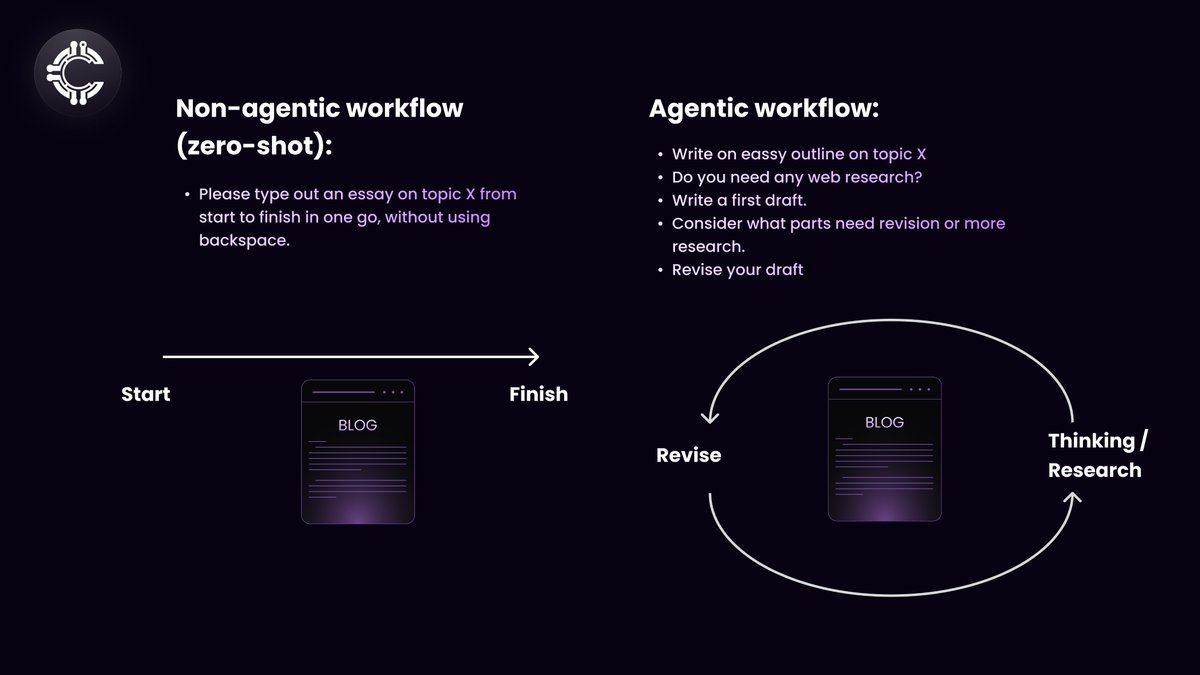
Notice how agentic workflow has unique ability to do the following -
Reflection - The ability of the AI to self-reflect without external prompts.
Tool use - If the AI needs to search the web for example, it needs appropriate tools to do so.
Planning - The ability of an AI agent or multiple AI agents to organize a project workflow in an appropriate sequence and indulge in reflect and trails if necessary
Multi-model collaboration - The ability of multiple agents with different tasks in one workflow to work collaboratively.
````The 4 properties mentioned above are exactly the AI agent patterns recommended by AI pioneer Andrew Ng````
This article explores the 4 patterns described above in depth to understand how an agentic AI workflow can transform the AI revolution by exponentially improving output quality from all measures.
The diagram below represents the 3 pillars of agentic workflows that need proper development and integration for a well functioning and highly advanced agentic workflow. The 3 pillars and their overview is discussed below:
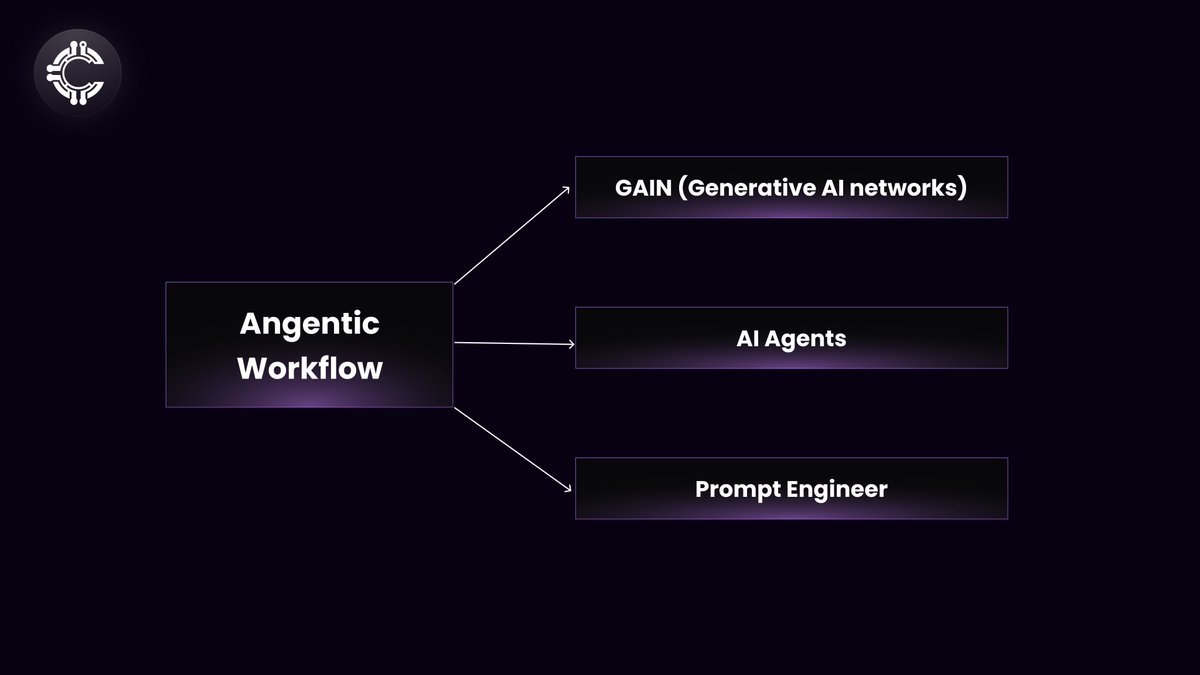
The Agentic Process
##Step One: Prompt engineering##
Defining the Workflow and Framework. This step involves establishing the foundational structure for how the system will function, detailing the roles of the agents, and their interaction with the large language models. Key tasks include:
Clarify Objectives: Identify the goals and purposes of the agentic workflow. What specific tasks or problems will it address?
Task Identification: Determine the tasks or processes the system needs to perform.
Task Allocation: Decide how these tasks are distributed among various agents or components.
Interaction Rules: Set up rules and protocols for communication between agents and large language models to ensure effective interaction.
Design Considerations: Incorporate scalability and flexibility into the design to meet future needs.
Workflow Components: Outline the essential components and stages of the workflow, such as data input, processing, decision-making, and output generation.
Information Flow: Define the flow of information and dependencies between different workflow stages.
Input/Output Specifications: Specify the input and output formats for each workflow stage.
Coordination Mechanisms: Define how agents will communicate and coordinate within the workflow.
Performance Metrics: Establish criteria to evaluate the effectiveness of the workflow.
##Step Two: AI Agents##
Defining and implementing specific roles for each AI agent. After setting up the workflow, the next step is to define and develop the agents within this framework. *This involves:*
Agent Capabilities: Detail the capabilities and responsibilities of each agent to align with the tasks from Step One.
Reactive Agents:
These agents operate based on a set of predefined rules and do not store past experiences. They are simple and suitable for tasks with predictable environments.
Deliberative Agents:
These agents use planning and reasoning to make decisions. They are suitable for more complex tasks where the agent needs to predict future states and outcomes. Learning Agents: These agents improve their performance over time by learning from the environment. They can be trained using reinforcement, supervised, or unsupervised learning.
Hybrid Agents:
These combine elements of the above types, allowing for more flexibility and adaptability in dynamic environments.
Technology Selection: Choose the technology stack or development platform for creating these agents, including programming languages, libraries, and tools suited for large language models.
Agent Development: Develop the agents by coding their behavior, setting up their environment, and testing their functionality within the workflow.
Role Definition: Specify the roles and responsibilities of each agent within the workflow.
Knowledge Requirements: Define the knowledge domains and skills needed for each agent to perform effectively.
Prompt Engineering: Implement techniques such as Chain of Thought (CoT) and self-reflection.
Model Architecture: Choose the appropriate large language model architecture and pre-training approach based on the agent’s role and capabilities.
Interfaces: Define the input and output interfaces for each agent to ensure compatibility with the overall workflow.
Communication Protocols: Set up communication protocols and APIs for agent interactions and external system integration.
Training and Validation: Train and test the agents with suitable datasets and fine-tuning methods, ensuring they meet performance criteria.
##Step Three: Automation with Generative AI Networks (GAINs)##
This optional step involves enhancing automation within the system using Generative AI Networks (GAINs). If pursued, this includes:
Feasibility Assessment: Evaluate the potential benefits and feasibility of automating parts of the workflow with GAINs.
Automation Opportunities: Explore how generative AI can automate tasks or create new workflows, such as generating text, images, or code.
GAIN Integration: Integrate GAINs into the workflow, including training models and setting up generative pipelines to align with goals.
Performance Monitoring: Continuously monitor and refine GAIN performance for efficiency, accuracy, and creativity.
Task Identification: Determine which workflow tasks or stages can be automated with GAINs.
GAIN System Architecture: Define the architecture, including generator and discriminator networks and additional modules.
Training Data: Identify data requirements and sources for the GAIN system.
Training Techniques: Implement training methods like adversarial training, reinforcement learning, or meta-learning.
System Integration: Ensure seamless integration of the GAIN system with other workflow components.
Performance Evaluation: Establish mechanisms to monitor and evaluate the reliability and performance of GAIN-automated tasks.
Considerations During development, keep in mind the following:
Scalability: Ensure the framework and agents can handle increased workloads and adapt to changes.
Robustness: Incorporate error handling, fault tolerance, and graceful degradation to maintain system stability.
Security and Privacy: Implement measures to protect data and prevent unauthorized access or misuse.
Ethical Concerns: Address ethical issues related to large language models and comply with relevant guidelines and regulations.
Iteration: Regularly review and refine the framework and agents based on feedback and evolving requirements.
Make sure to choose the Right Platform. Reputable platforms for Building AI Agents:
OpenAI Gym: Ideal for creating reinforcement learning agents and testing them in various simulated environments.
TensorFlow/ PyTorch: These are popular machine learning frameworks that provide extensive libraries for building and training AI models.
Unity ML-Agents: A toolkit for developing and training agents within Unity environments, useful for complex simulations and games.
Rasa: If you're working on conversational AI, Rasa is a platform for building, training, and deploying chatbots and voice assistants.
AWS DeepRacer: For those interested in reinforcement learning in autonomous vehicles, AWS DeepRacer offers a cloud-based platform.
Example - Notion AI’s use of AI agents to create user-ready and usable templates.
Notion is a famous all-in-one workspace app that combines note-taking, task management, databases, and collaboration tools into a single platform. It’s designed to help individuals and teams organize their work, plan projects, track progress, and manage information in a highly customizable way.
Below is an exploration of how Notion AI uses AI agents to create highly personalized templates that its users can create, use and share!
To begin with, it is important to understand why Notion uses AI agents to provide their users with AI enhanced templates that are highly personal
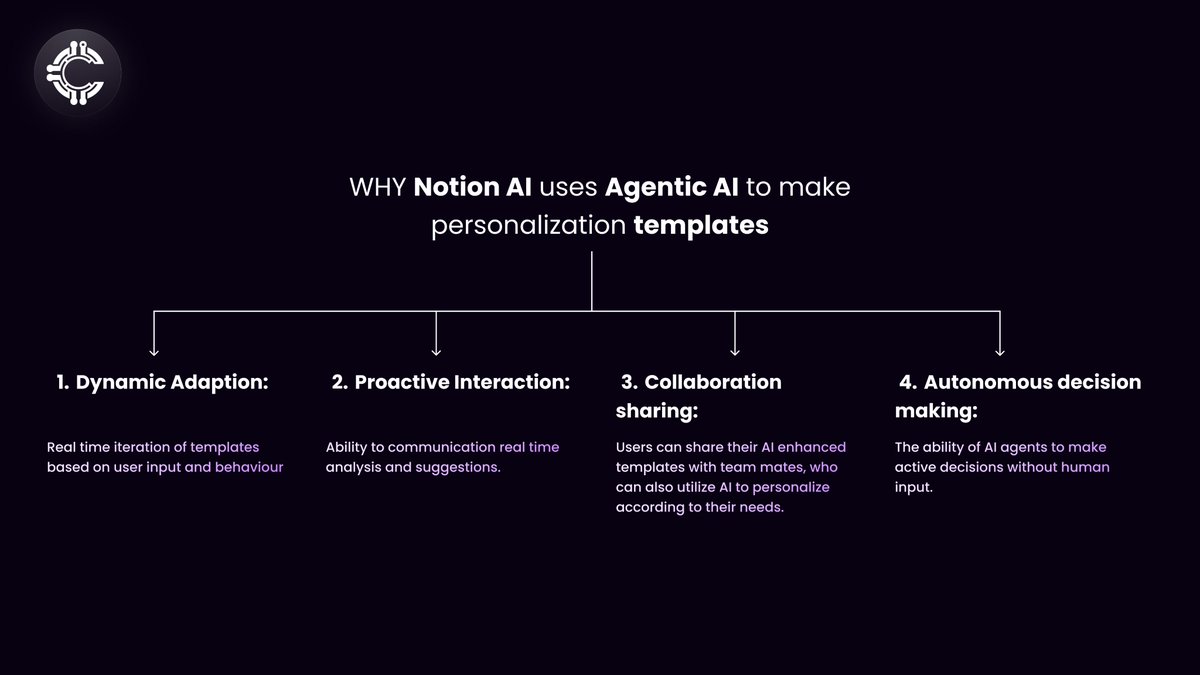
Dynamic Adaptation: Notion AI doesn’t just provide static templates; it actively adjusts them based on user input and behavior. For example, if a user starts a project management template but changes the scope, the AI can recommend adjustments to the task structure, deadlines, or even suggest additional sections that might be relevant.
Proactive Interaction: Notion AI frequently anticipates user needs. If it notices repetitive tasks, it can suggest turning those into a reusable template. Similarly, if a user often forgets to assign tasks, the AI might recommend an automated assignment workflow.
Collaborative Sharing: Once an AI-enhanced template is created, it can be shared with others, allowing teams to benefit from the same agentic AI-driven workflows. This capability extends the power of agentic AI beyond individual use, standardizing and improving team-wide productivity.
Autonomous Decision-Making: Within the scope of its capabilities, Notion AI can make decisions autonomously. For instance, when generating a report template, the AI might autonomously decide to include recent project updates or relevant metrics based on the user’s past activity.
Now with an understanding of the benefits AI agents provide to Notion users through the use of intelligent features like proactive interaction and real time iteration based on feedback, it is intuitive to delve into the technical details about how Notion uses OpenAI’s ChatGPT API to make this happen. This section is written with an intention to provide the reader with a brief understand of how AI agents are trained and implemented on the back end -
So, what powers Notion AI?
Notion AI primarily leverages models from OpenAI, the specifics of its training are closely related to how large language models (LLMs) like GPT are trained, combined with Notion’s unique customizations for its platform. Below is an analytical summary of the components required in the training, syncing and implementation of AI agents, with special focus on the training of Notion AI:
1. Foundation: Large Language Models (LLMs)
Core Technology: OpenAI’s GPT Models: Notion AI uses GPT models developed by OpenAI as the backbone for natural language processing (NLP). These models are trained on massive datasets, containing a wide variety of text from books, articles, websites, and more. The training involves:
Transformer Architecture: The GPT model is based on the Transformer architecture, which uses self-attention mechanisms to process and generate text.
Training Data: OpenAI's GPT models are trained on diverse and extensive datasets from the web, including Common Crawl, books, and academic papers, with careful data filtering to ensure quality and diversity.
2. Programming Languages and Libraries
Python: The primary programming language used for AI model development, training, and integration. Python is favored for its rich ecosystem of AI and machine learning libraries.
TensorFlow and PyTorch: These are the two most widely used deep learning libraries. OpenAI primarily uses PyTorch for developing its models due to its flexibility and dynamic computation graph.
Hugging Face Transformers: Although OpenAI develops its models independently, the Hugging Face library is a common tool for working with transformer models, including GPT variants.
CUDA/C++: These languages are used for high-performance computing tasks during training, especially in handling GPU operations for deep learning models.
3. Training Infrastructure
GPUs/TPUs: The training of LLMs like GPT typically involves massive GPU clusters or Tensor Processing Units (TPUs) to handle the intensive computational demands. NVIDIA GPUs are commonly used for such training tasks.
Distributed Training: Due to the size of the models, training is distributed across many machines. Technologies like Horovod (for TensorFlow/PyTorch) or DeepSpeed (by Microsoft) are used to scale training across multiple GPUs.
4. Data Preprocessing and Management
Natural Language Toolkit (NLTK) & SpaCy: Libraries like NLTK and SpaCy are commonly used for text preprocessing, tokenization, and managing linguistic features before feeding data into the model.
Pandas and NumPy: Python libraries for data manipulation and numerical computation, essential in preparing datasets for model training.
5. Fine-Tuning and Customization by Notion
Custom Fine-Tuning: While OpenAI provides the base GPT models, Notion likely fine-tunes these models with domain-specific data to better align with their application. Fine-tuning involves adjusting the pretrained model using smaller, more focused datasets that represent the specific use cases within Notion.
Domain-Specific Data: Notion may use anonymized user interaction data (with privacy safeguards) to fine-tune the model for better relevance in generating content, organizing data, and making suggestions.
Reinforcement Learning: Notion AI could use reinforcement learning techniques, such as Reinforcement Learning from Human Feedback (RLHF), to further refine the model’s behavior based on user interactions.
6. Integration and Deployment
APIs: OpenAI’s GPT models are accessed via API calls. Notion integrates these APIs into their system, enabling real-time AI assistance.
Microservices Architecture: Notion AI is likely built on a microservices architecture, where various components (like NLP, data retrieval, task automation) communicate through APIs. This architecture allows for scalability and independent updates.
Docker and Kubernetes: For deployment, containerization technologies like Docker are likely used, with Kubernetes managing the orchestration across different services.
7. Security and Privacy
Data Encryption: All data interactions are encrypted, ensuring secure communication between Notion’s platform and the AI models.
Privacy by Design: Notion adheres to strict privacy policies, ensuring that any data used for training or fine-tuning is anonymized and handled according to industry standards.
8. Monitoring and Continuous Learning
Model Monitoring: Notion likely employs monitoring tools to track the performance of the AI, such as Datadog or Prometheus, ensuring that the AI remains reliable and responsive.
Continuous Learning and Feedback Loops: Based on user feedback, Notion AI continuously learns and improves. This could involve retraining models periodically or updating fine-tuning processes to incorporate new data and use cases.
##Process flow##
A hypothetical scenario of AI agents working together -
Hypothetical Scenario - Business environment with 4 AI agents with the following roles -
AI agent 1: CEO
AI agent 2: Personal assistant
AI agent 3: Programmer
AI agent 4: Accountant
Role Assignments and Responsibilities
CEO: Strategic decision-making, overseeing the project, and setting high-level goals.
Personal Assistant: Handling day-to-day scheduling, managing communications, and supporting the CEO.
Programmer: Developing the software or product, coding, and ensuring technical implementation.
Accountant: Managing the budget, tracking expenses, and ensuring financial accuracy.
Here’s a quick rundown of how to create a workflow involving four AI agents with assigned roles:
Step 1: Define the Workflow Goal
Objective: Automate business operations using AI agents with distinct roles that collaborate.
Goal: The CEO agent strategizes and makes high-level decisions. The Personal Assistant manages scheduling, communication, and reminders. The Programmer develops software, and the Accountant manages finances.
Step 2: Identify Data Sources and Inputs
CEO Agent:
Inputs: Market data, company KPIs, reports from other agents.
Sources: Financial databases, CRM, industry news.
Personal Assistant Agent:
Inputs: Emails, calendar events, task lists.
Sources: Google Calendar, Slack, project management tools (e.g., Asana, Trello).
Programmer Agent:
Inputs: Codebase, development tasks, bug reports.
Sources: GitHub, Jira, Stack Overflow.
Accountant Agent:
Inputs: Financial statements, invoices, expense reports.
Sources: Accounting software (e.g., QuickBooks), bank feeds, payroll systems.
Step 3: Select or Train the AI Models
CEO Agent:
Model: Use a GPT model fine-tuned on leadership, strategy, and decision-making.
Specialization: Trained on market analysis, strategic planning, and risk assessment.
Personal Assistant Agent:
Model: A GPT model for natural language processing (NLP), integrated with calendar management and email parsing tools.
Specialization: Scheduling, email drafting, reminders.
Programmer Agent:
Model: Codex (a GPT model specialized for programming) or a similar code generation model.
Specialization: Writing and debugging code, reviewing pull requests.
Accountant Agent:
Model: A model trained on financial data, accounting principles, and report generation.
Specialization: Budgeting, financial forecasting, bookkeeping.
Step 4: Implement Workflow Logic
CEO Agent:
Logic: Strategic decision-making based on inputs from the other agents, with a feedback loop to assess outcomes.
Decision Path: Prioritize tasks based on company goals and external data.
Personal Assistant Agent:
Logic: Automate scheduling, reminders, and communication based on priorities set by the CEO agent.
Decision Path: Delegate tasks to the other agents or schedule meetings based on CEO input.
Programmer Agent:
Logic: Develop and maintain software according to a product roadmap provided by the CEO agent.
Decision Path: Prioritize coding tasks, resolve bugs, and review code with input from the CEO agent.
Accountant Agent:
Logic: Manage finances based on budgeting rules set by the CEO agent, generate reports, and ensure compliance.
Decision Path: Track expenses, manage payroll, and report financial health.
Step 5: Integrate AI into the Workflow
CEO Agent:
Integration: API that pulls market data, integrates with dashboards, and interfaces with other agents.
Personal Assistant Agent:
Integration: Sync with calendar and email systems via APIs, with Slack integration for communication.
Programmer Agent:
Integration: Connect to GitHub, Jira, and code deployment pipelines.
Accountant Agent:
Integration: Connect to accounting software, banking APIs, and payroll systems.
Step 6: Monitor and Optimize
Objective:
Continuously monitor agent performance and interactions.
Components:
CEO Agent: Track the success of strategic decisions through KPIs and adjust models based on performance.
Personal Assistant Agent: Monitor task completion rates and user satisfaction.
Programmer Agent: Evaluate code quality, development speed, and bug resolution rates.
Accountant Agent: Track financial accuracy, budget adherence, and compliance metrics.
Step 7: Implement Safeguards and Compliance
CEO Agent:
Safeguards: Ensure decisions align with company values and ethical guidelines.
Compliance: Monitor for antitrust, labor law, and industry-specific regulations.
Personal Assistant Agent:
Safeguards: Privacy controls for personal data.
Compliance: GDPR and similar regulations.
Programmer Agent:
Safeguards: Code review and security checks.
Compliance: Licensing, intellectual property rights.
Accountant Agent:
Safeguards: Financial audits and checks.
Compliance: Tax laws, financial regulations, and audits.
In conclusion, the example provided above provides a quick rundown of the linear process of creating and integrating AI agents. As one may notice, the main purpose of developing AI agents is to provide robots with the ability to inter-play and take strategic decisions by themselves without human input. The big advancement in agentic AI is the ability of an AI agent to self-reflect, use tools (like web search), plan strategies, and collaborate all with just the help of a few other AI agents, which we refer to as the workflow. AI pioneers like Andrew Ng have denoted agentic AI as the catalyst technology that will significantly advance the world of AI.
The article above discussed agentic AI with similar sentiments to Andrew by first discussing its basic principles and delving into the fundamentals. Following the discussion of the basics, the article takes a real-world example of Notion AI and how it leverages agentic AI workflows to provide highly-customizable (using AI) templates for its users.
To end, the article used an innovative way to bring the point of Agentic AI home. By leveraging a hypothetical business scenario with AI agents representing key management players like the CEO and accountants, the article discussed the crux of what it would look like to develop an agentic AI workflow serving a particular purpose in a business scenario.
Agentic AI workflows carry tremendous potential to revolutionize various industries by enhancing processes, personalizing experience and reducing costs, because of which Cluster Protocol is excited to implement agentic AI’s in our DePIN infrastructure of compute sharing where we will utilize AI agents to create highly customizable and advanced templates for our users.
Stay in touch by following our social media!
About Cluster Protocol
Cluster Protocol is a decentralized infrastructure for AI that enables anyone to build, train, deploy and monetize AI models within few clicks. Our mission is to democratize AI by making it accessible, affordable, and user-friendly for developers, businesses, and individuals alike. We are dedicated to enhancing AI model training and execution across distributed networks. It employs advanced techniques such as fully homomorphic encryption and federated learning to safeguard data privacy and promote secure data localization.
Cluster Protocol also supports decentralized datasets and collaborative model training environments, which reduce the barriers to AI development and democratize access to computational resources. We believe in the power of templatization to streamline AI development.
Cluster Protocol offers a wide range of pre-built AI templates, allowing users to quickly create and customize AI solutions for their specific needs. Our intuitive infrastructure empowers users to create AI-powered applications without requiring deep technical expertise.
Cluster Protocol provides the necessary infrastructure for creating intelligent agentic workflows that can autonomously perform actions based on predefined rules and real-time data. Additionally, individuals can leverage our platform to automate their daily tasks, saving time and effort.
🌐 Cluster Protocol’s Official Links: